けど、Paddingを1以上にしたら、期待通りのきれいな画像で保存できた
現象

//普通に要素のサイズで、BitmapCacheBrushで描画
private void Test2(FrameworkElement element, string fileName)
{
    Rect bounds = new(0, 0, element.ActualWidth, element.ActualHeight);

    var dv = new DrawingVisual();
    using (var context = dv.RenderOpen())
    {
        BitmapCacheBrush bru = new(element);
        context.DrawRectangle(bru, null, bounds);
    }
    RenderTargetBitmap bmp = new((int)Math.Ceiling(bounds.Width), (int)Math.Ceiling(bounds.Height), 96, 96, PixelFormats.Pbgra32);
    bmp.Render(dv);

    string? methodName = MethodBase.GetCurrentMethod()?.Name;
    Save(bmp, $"{fileName}{methodName}.png");
}
画像として保存されたのが


影響するのは背景色だけじゃない
アプリに表示されているTextBlock

これと保存された画像を比較してみると

文字の横位置が違う。横幅も違うと思いきや

Paddingを1以上にするといい

Paddingを1にして保存した画像がこれ

拡大して比較
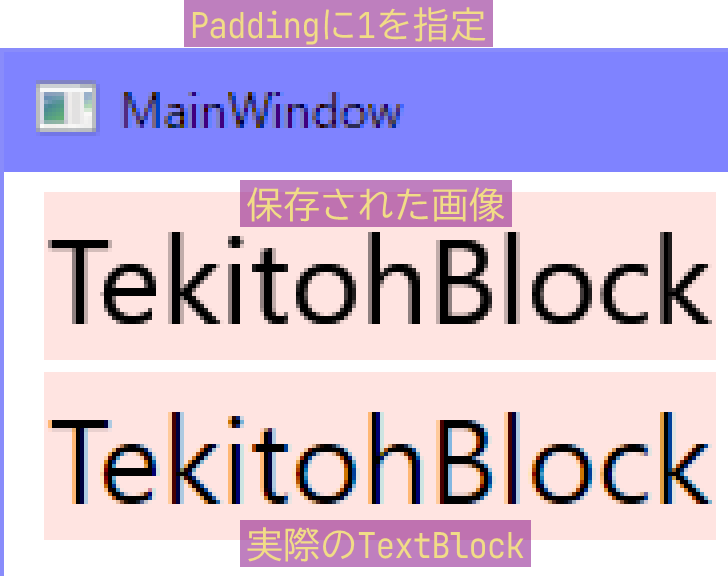
あとはフォントのClearType有効時の見た目を再現した画像にするには
BitmapCacheBrushのBitmapCacheに
EnableClearTypeをtrueにしたBitmapCacheを指定する
//BitmapCacheBrushのキャッシュモードのEnableClearTypeを有効にして、描画した画像を保存
//要素に文字列があるとき、ClearTypeが有効時の見た目で保存される
private void Test2WithClearType(FrameworkElement element, string fileName)
{
    Rect bounds = new(0, 0, element.ActualWidth, element.ActualHeight);

    var dv = new DrawingVisual();
    using (var context = dv.RenderOpen())
    {
        BitmapCacheBrush bru = new(element);
        BitmapCache bcMode = new() { EnableClearType = true };
        bru.BitmapCache = bcMode;
        context.DrawRectangle(bru, null, bounds);
    }

    RenderTargetBitmap bmp = new((int)Math.Ceiling(bounds.Width), (int)Math.Ceiling(bounds.Height), 96, 96, PixelFormats.Pbgra32);
    bmp.Render(dv);

    string? methodName = MethodBase.GetCurrentMethod()?.Name;
    Save(bmp, $"{fileName}{methodName}.png");
}
これで保存された画像が

拡大して比較してみると

でも、これはこれでいいね
試したこと
Paddingが0でもなんとかならないかと
描画の位置やサイズの調整をしてみたけど、どれもうまくいかなかった
DrawingVisualのOffset
DrawingRectangleでのRect調整
このあたり
子要素がすべて収まるRectを返してくれるメソッドがVisualTreeHelperクラスにあって
VisualTreeHelper.GetDescendantBounds(element);
これにPaddingが0のTextBlockを渡して返ってきたRectを見ると
左端の文字によっては、X座標が0じゃなくてマイナス0.4とかのものがあって、そういう場合は左端が半透明になっていた

なので、このマイナス分をDrawingVisualや、そのDrawingRectangleとかでオフセットしたり、サイズ調整すればいいのかなと試したけど、どうにもならなかった
TextBlock要素からBitmapCacheBrushを作成した時点で、そのブラシ自体がズレているのかも
テストアプリのコード
2025WPF/20250424 at main · gogowaten/2025WPF
github.com
環境
- Windows 10 Home バージョン 22H2
- Visual Studio Community 2022 Version 17.13.6
- WPF
- C#
- .NET 8.0
MainWindow.xaml
<Window x:Class="_20250424.MainWindow"
        xmlns="http://schemas.microsoft.com/winfx/2006/xaml/presentation"
        xmlns:x="http://schemas.microsoft.com/winfx/2006/xaml"
        xmlns:d="http://schemas.microsoft.com/expression/blend/2008"
        xmlns:mc="http://schemas.openxmlformats.org/markup-compatibility/2006"
        xmlns:local="clr-namespace:_20250424"
        mc:Ignorable="d"
        Title="MainWindow" Height="367" Width="654">
  <Grid>
    <Grid.ColumnDefinitions>
      <ColumnDefinition/>
      <ColumnDefinition Width="200"/>
    </Grid.ColumnDefinitions>
    <Canvas x:Name="MyCanvas" UseLayoutRounding="True">
      <TextBlock x:Name="MyUC" Canvas.Left="10" Canvas.Top="50"
                 FontSize="30" Background="MistyRose"
                 Text="TekitohBlock"
                 Padding="1"/>

    </Canvas>


    <StackPanel Grid.Column="1">
      <Button Content="test" Click="Button_Click"/>
    </StackPanel>
  </Grid>
</Window>
MainWindow.xaml.cs
using System.IO;
using System.Reflection;
using System.Text;
using System.Windows;
using System.Windows.Controls;
using System.Windows.Data;
using System.Windows.Documents;
using System.Windows.Input;
using System.Windows.Media;
using System.Windows.Media.Imaging;
using System.Windows.Navigation;
using System.Windows.Shapes;
//要素を画像として保存
//TextBlock
//Paddingが0だとズレてぼやけることがある
//フォントや文字によっては、ずれないときもある
//対象は左端の文字、1文字目だけ
//左端の文字がTだとずれる、けどUだとずれない
//防ぐにはPaddingを1以上にするしかない?
//ずれるかどうかの判定は
//VisualTreeHelper.GetDescendantBounds(element);
//これで得られるRectのX座標がマイナスの値だとずれる、0ならずれないとおもったけど、
//0でもずれる(半透明になる)

namespace _20250424
{
    /// <summary>
    /// Interaction logic for MainWindow.xaml
    /// </summary>
    public partial class MainWindow : Window
    {
        public MainWindow()
        {
            InitializeComponent();
        }

        private void Button_Click(object sender, RoutedEventArgs e)
        {

            //SavePng(MyTextBlock);
            string fileName = $"E:20250424_";
            Test2WithClearType(MyUC, fileName);
            Test2(MyUC, fileName);
            Test3(MyUC, fileName);
            Test4(MyUC, fileName);
            Test5(MyUC, fileName);
            Test6(MyUC, fileName);
        }


        //よくわからん
        private void Test6(FrameworkElement element, string fileName)
        {
            Rect bounds = VisualTreeHelper.GetDescendantBounds(element);

            var dv = new DrawingVisual();
            dv.Offset = new Vector(-bounds.X, -bounds.Y);
            bounds.Width += bounds.X;
            bounds.Height += bounds.Y;
            using (var context = dv.RenderOpen())
            {
                BitmapCacheBrush bru = new(element);
                context.DrawRectangle(bru, null, bounds);
            }
            RenderTargetBitmap bmp = new((int)Math.Ceiling(bounds.Width), (int)Math.Ceiling(bounds.Height), 96, 96, PixelFormats.Pbgra32);
            bmp.Render(dv);

            string? methodName = MethodBase.GetCurrentMethod()?.Name;
            Save(bmp, $"{fileName}{methodName}.png");
        }

        //GetDescendantBoundsのサイズと描画位置を0,0で保存
        private void Test5(FrameworkElement element, string fileName)
        {
            Rect bounds = VisualTreeHelper.GetDescendantBounds(element);
            bounds = new Rect(0, 0, bounds.Width, bounds.Height);

            var dv = new DrawingVisual();
            using (var context = dv.RenderOpen())
            {
                BitmapCacheBrush bru = new(element);
                context.DrawRectangle(bru, null, bounds);
            }
            RenderTargetBitmap bmp = new((int)Math.Ceiling(bounds.Width), (int)Math.Ceiling(bounds.Height), 96, 96, PixelFormats.Pbgra32);
            bmp.Render(dv);

            string? methodName = MethodBase.GetCurrentMethod()?.Name;
            Save(bmp, $"{fileName}{methodName}.png");
        }

        //GetDescendantBoundsのサイズとDrawingVisualをオフセットして保存
        private void Test4(FrameworkElement element, string fileName)
        {
            Rect bounds = VisualTreeHelper.GetDescendantBounds(element);

            var dv = new DrawingVisual();
            dv.Offset = new Vector(-bounds.X, -bounds.Y);
            using (var context = dv.RenderOpen())
            {
                BitmapCacheBrush bru = new(element);
                context.DrawRectangle(bru, null, bounds);
            }
            RenderTargetBitmap bmp = new((int)Math.Ceiling(bounds.Width), (int)Math.Ceiling(bounds.Height), 96, 96, PixelFormats.Pbgra32);
            bmp.Render(dv);

            string? methodName = MethodBase.GetCurrentMethod()?.Name;
            Save(bmp, $"{fileName}{methodName}.png");
        }

        //GetDescendantBoundsのサイズと位置で保存
        private void Test3(FrameworkElement element, string fileName)
        {
            Rect bounds = VisualTreeHelper.GetDescendantBounds(element);

            var dv = new DrawingVisual();
            using (var context = dv.RenderOpen())
            {
                BitmapCacheBrush bru = new(element);
                context.DrawRectangle(bru, null, bounds);
            }
            RenderTargetBitmap bmp = new((int)Math.Ceiling(bounds.Width), (int)Math.Ceiling(bounds.Height), 96, 96, PixelFormats.Pbgra32);
            bmp.Render(dv);

            string? methodName = MethodBase.GetCurrentMethod()?.Name;
            Save(bmp, $"{fileName}{methodName}.png");
        }

        //普通に要素のサイズで、BitmapCacheBrushで描画
        private void Test2(FrameworkElement element, string fileName)
        {
            Rect bounds = new(0, 0, element.ActualWidth, element.ActualHeight);

            var dv = new DrawingVisual();
            using (var context = dv.RenderOpen())
            {
                BitmapCacheBrush bru = new(element);
                context.DrawRectangle(bru, null, bounds);
            }
            RenderTargetBitmap bmp = new((int)Math.Ceiling(bounds.Width), (int)Math.Ceiling(bounds.Height), 96, 96, PixelFormats.Pbgra32);
            bmp.Render(dv);

            string? methodName = MethodBase.GetCurrentMethod()?.Name;
            Save(bmp, $"{fileName}{methodName}.png");
        }

        //BitmapCacheBrushのキャッシュモードのEnableClearTypeを有効にして、描画した画像を保存
        //要素に文字列があるとき、ClearTypeが有効時の見た目で保存される
        private void Test2WithClearType(FrameworkElement element, string fileName)
        {
            Rect bounds = new(0, 0, element.ActualWidth, element.ActualHeight);

            var dv = new DrawingVisual();
            using (var context = dv.RenderOpen())
            {
                BitmapCacheBrush bru = new(element);
                BitmapCache bcMode = new() { EnableClearType = true, SnapsToDevicePixels = true };
                bru.BitmapCache = bcMode;
                context.DrawRectangle(bru, null, bounds);
            }

            RenderTargetBitmap bmp = new((int)Math.Ceiling(bounds.Width), (int)Math.Ceiling(bounds.Height), 96, 96, PixelFormats.Pbgra32);
            bmp.Render(dv);

            string? methodName = MethodBase.GetCurrentMethod()?.Name;
            Save(bmp, $"{fileName}{methodName}.png");
        }

        private void Save(BitmapSource bmp, string fileName)
        {
            var enc = new PngBitmapEncoder();
            enc.Frames.Add(BitmapFrame.Create(bmp));
            using FileStream stream = new(fileName, FileMode.Create, FileAccess.Write);
            enc.Save(stream);
        }
    }
}
Eドライブに20250424_Test2.pngとかの名前で画像が保存される
感想
Paddingの既定値の0では解決できなかったけど、Padding0も1も見た目上は大差ないからこれでいい
でも、それを言うなら左端1ピクセルが半透明も大差ないのでは?
参照したところ
WPF/C# コントロールの要素をキャプチャする #C# - Qiita
qiita.com
ここを見るまではVisualBrushを使っていたんだけど、低画質になるのは気づかなかった
なので今回はBitmapCacheBrushを使ったんだけど、今までのを書き直そうかと思ってgithubを検索したら50件以上あって諦めた
関連記事
次のWPF記事
C#で3点ABCからできる∠ABCの角度を求める関数をGitHub Copilotに作ってもらった - 午後わてんのブログ
gogowaten.hatenablog.com
前回のWPF記事
WPF、昨日のは失敗だった、変形時にPoint変化で全体が移動してしまう - 午後わてんのブログ
gogowaten.hatenablog.com
